

Plan one repeatable task
Build around general infantry, medical support, reconnaissance, breaching, construction or transport. First confirm access; then buy the weapon, ready magazines, ammunition, medical supplies, protection and the task tool. Optional attachments come after the complete kit can be replaced.
Season 02 access checkpoints
| Item | Level gate | Permanent access payment |
|---|---|---|
| AK74 | Unlocked by default | No unlock payment |
| M4 | Assault 28 | $150,000 |
| MP5 | Medic 4 | $25,000 |
| PP-19 Bizon | Unlocked by default | No unlock payment |
| Medical Bag | Medic 14 | $50,000 |
| Defibrillator | Medic 22 | $110,000 |
| Remote Detonator + C4 | Assault 4 | Not restated |
| Molotov Cocktail | Assault 13 | $25,000 |
AK74 and Bizon default access does not make their deployment free. Medical Bag access does not include the Defibrillator. Assault now receives C4 and the new Molotov; check the separate access payment and current vendor price for each item.
Budget the complete cart
AK74: Deployment price $800 (Season 02 notes); Level gate Unlocked by default (Season 02 notes); Permanent access payment No unlock payment (Season 02 notes).
PP-19 Bizon: Deployment price $1,000 (Season 02 notes); Level gate Unlocked by default (Season 02 notes); Permanent access payment No unlock payment (Season 02 notes).
MP5: Deployment price $1,800 (Season 02 notes); Level gate Medic 4 (Season 02 notes); Permanent access payment $25,000 (Season 02 notes).
These are weapon costs, not complete-kit totals. Add compatible magazines, ammunition, protection, storage and tools. Keep a repeat-deployment reserve from the current wallet; do not spend expected future rewards in advance.
| Vendor discount | Minimum points behind second place | Scope |
|---|---|---|
| 20% | 40 | All teams |
This is a conditional team discount, not a permanent price cut for every loadout. Confirm the actual cart total before purchase.
Rebuy, edit, then purchase
Season 02's Rebuy Last Loadout fills the equipment vendor visually with the previous loadout. Add or remove items before buying. Check ammunition, medical supplies, weight and the total again; the action does not supply free replacements.
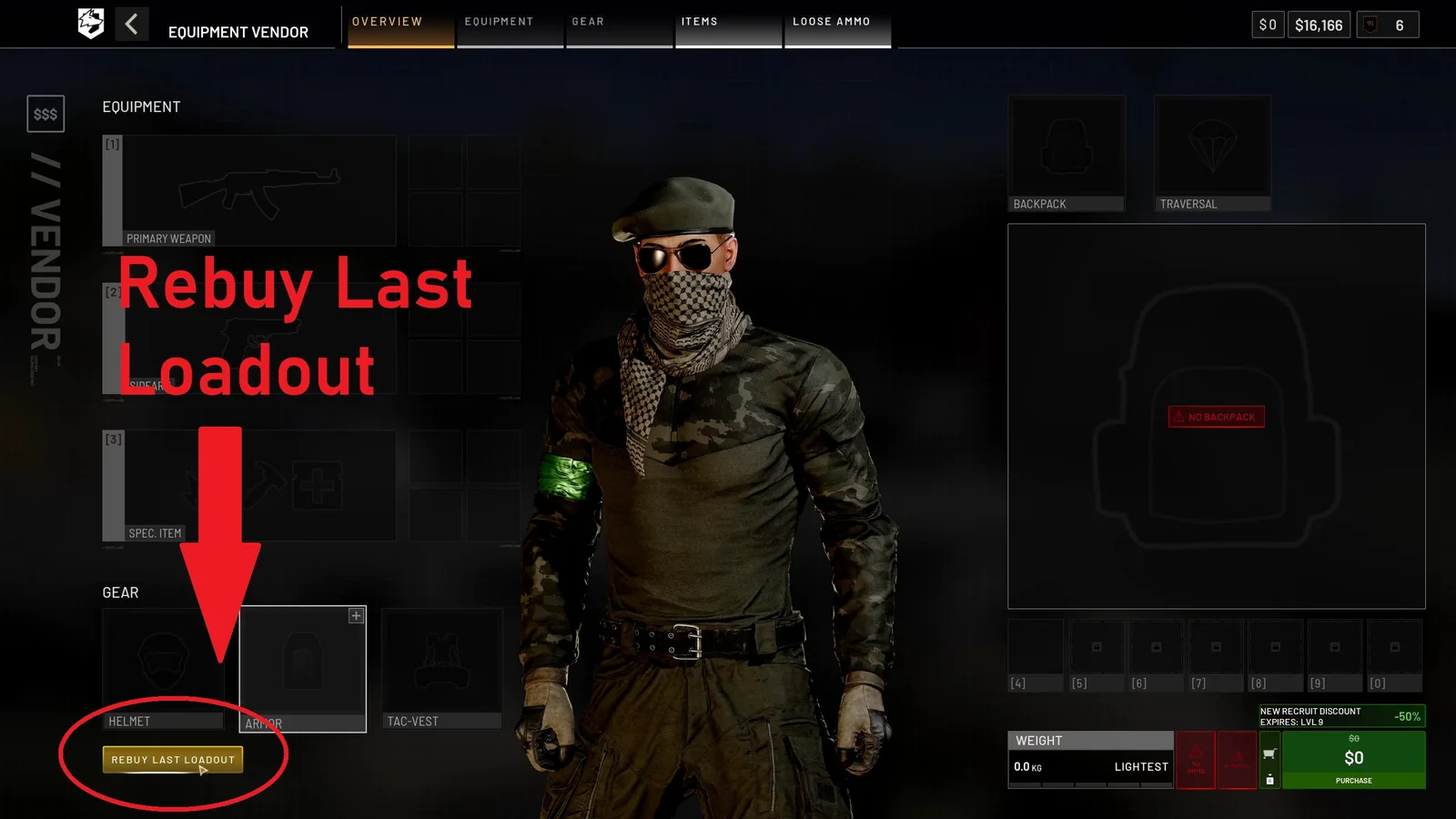
01 Rebuy before changing the cartThe vendor overview exposes Rebuy Last Loadout before another purchase is made. Open it first, remove anything the next task does not need, then check the new total.
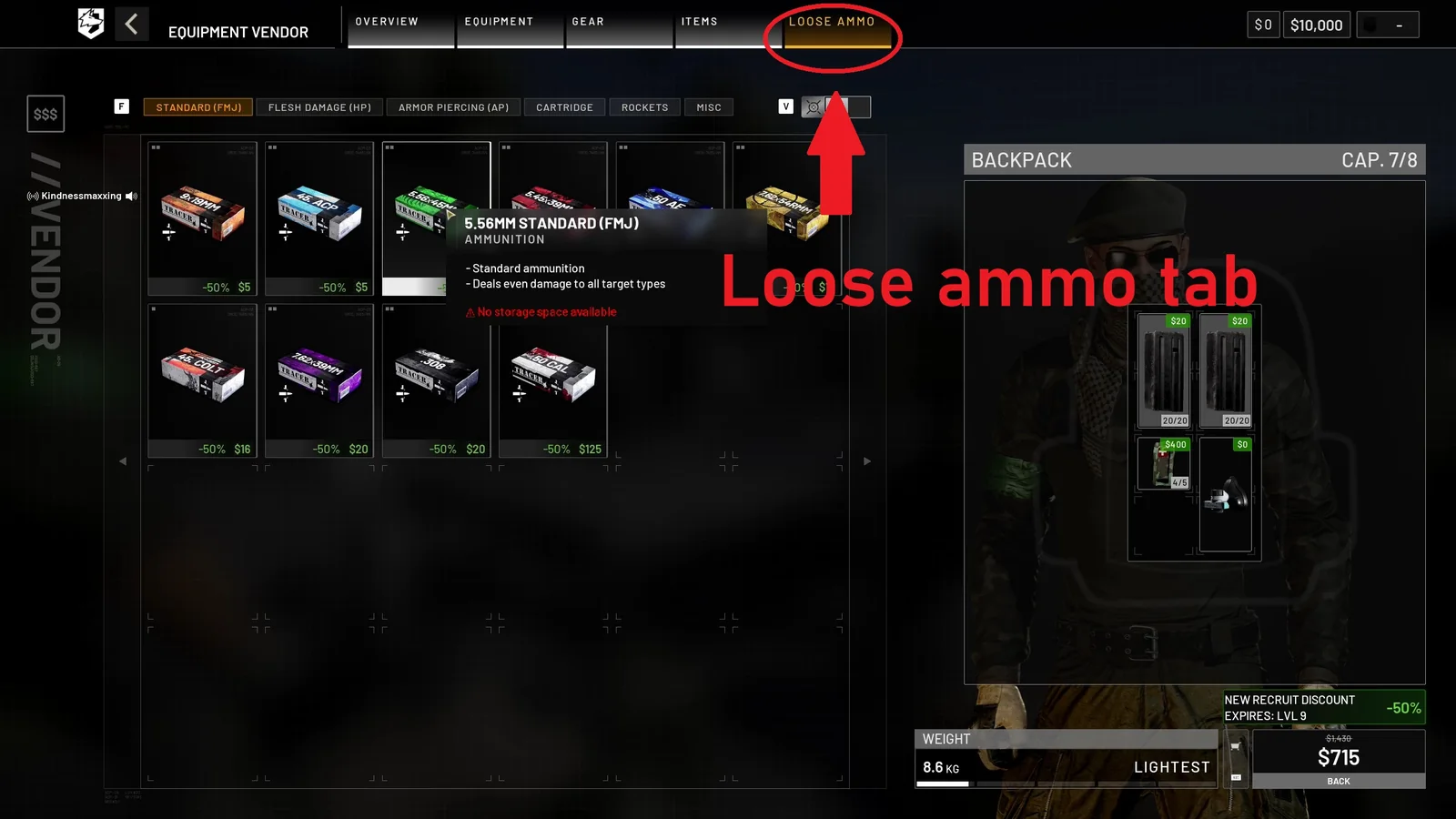
02 Add matching loose ammunitionUse the Loose Ammo tab after selecting the weapon and magazines. Match the caliber, confirm backpack space and keep at least one loaded magazine ready before deployment.
PC Gamer Early Access guide screenshots, credited to BULKHEAD · September 10, 2026 · source
These earlier interface captures explain the vendor workflow. The Season 02 behavior above comes from the patch notes; current labels and bindings take priority.
Adapt equipment to the route
- Infantry: a usable primary, loaded magazines, matching loose rounds and self-care before optics.
- Medical support: an affordable primary, accessible revive tools, smoke and reachable medical storage; use the Medic guide.
- Recon: useful sightlines and marking equipment; budget the Infrared Range Finder's battery use and price.
- Breaching: Halligan for doors and gates; C4 or Molotov only when accessible. Hammers no longer breach.
- Construction: FOB, correct hammer, Build supplies and recurring Fuel or Ammo deliveries; use building.
- Transport: agree on destination, crew and cargo; check the slower parachute opening before committing to a jump.
Review the next deployment
Level 4 helmet restrictions, changed armor protection and the larger 30mm inventory footprint can invalidate an old saved kit. After a life, remove unused items and change one variable at a time. Check equipment, ammunition and attachments for the confirmed limits. These are task-based purchase orders, not measured meta builds; changes are sourced to the official Season 02 notes.
Read every value with its version.
Official changes use first-party announcements. Item fields without a current official table remain labeled as dated gameplay records until they can be checked in the public client.